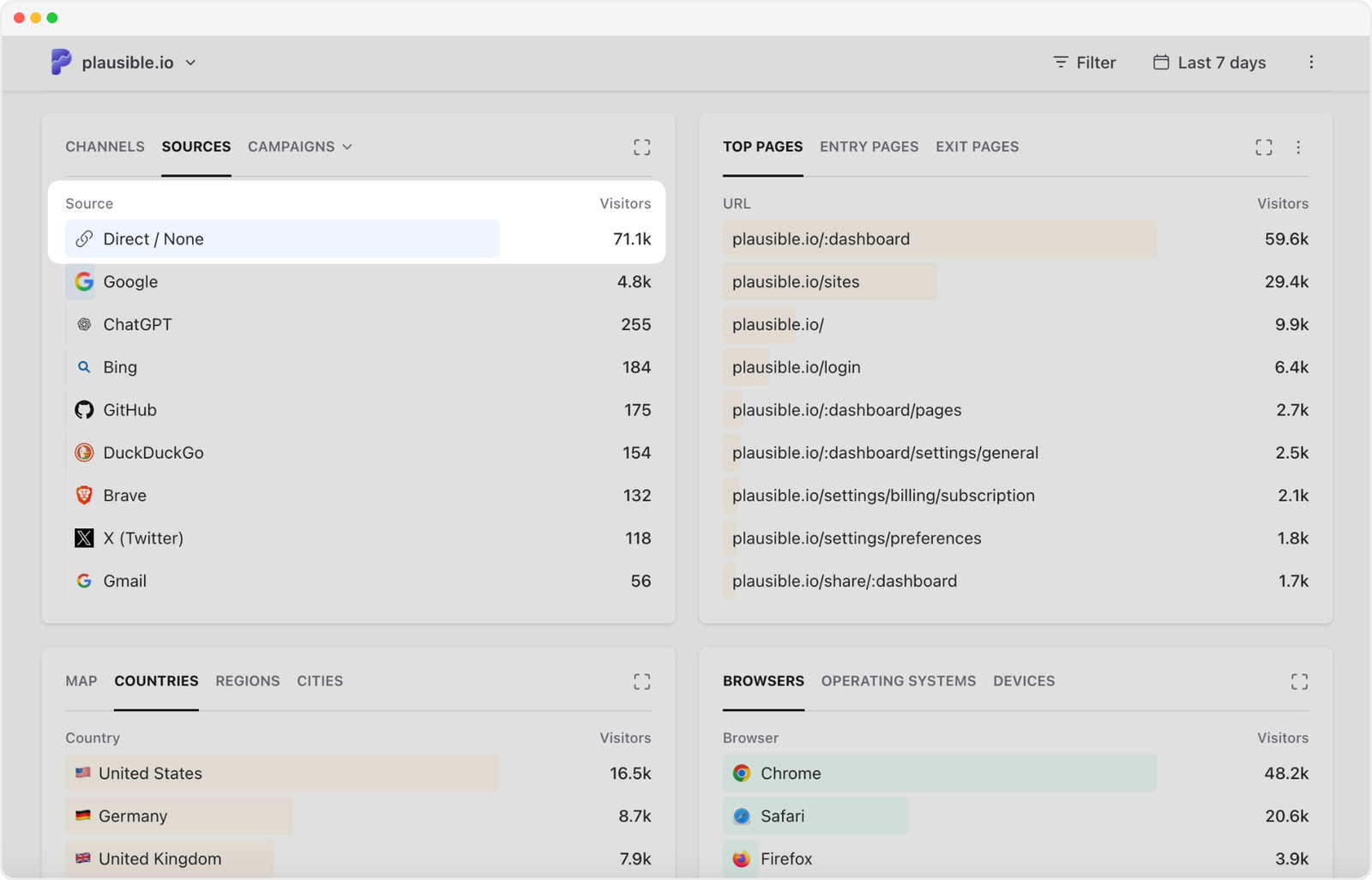
Is “Direct” your biggest traffic source, ahead of search, social, AI assistants and referrals from other websites? You put effort into those channels, yet the biggest row in your report doesn’t tell you where anyone came from. And some of those “direct” visitors are landing on URLs you wouldn’t expect anyone to remember, let alone type.
So where are they actually coming from?
Direct means your analytics couldn’t identify the source of the visit. Typing your address is one way to get there. Clicking an untagged newsletter link, opening a recommendation in a messaging app, or following a link that loses its source information can produce the same result. In Plausible, these visits appear as Direct / None.
Some of this can absolutely reflect brand strength: people remember you, choose to come back, or recommend you to someone else. The question is how much of your traffic reflects that familiarity, and how much you could identify with better campaign tagging.
If you’re looking at Google Analytics, its (direct) / (none) label refers to the same basic issue: no clear source for the traffic. The concerns below apply there too; the dashboard steps are for Plausible.
- Why is direct traffic my biggest source?
- Nobody is typing these long URLs. Where are those visits coming from?
- Why are new visitors showing up as direct? They’ve never heard of us
- We sent a newsletter. Why did direct go up instead of email?
- We already added UTMs. Why is traffic still showing as direct?
- Are browsers and privacy tools hiding the source?
- Direct traffic suddenly spiked. Is it bots?
- How can I make my traffic reports more accurate?
- Can I find out where the rest of my direct traffic came from?
- Should I worry about a high direct share?
Why is direct traffic my biggest source?
Because Direct can collect visits from several places whose sources aren’t identifiable for some reason.
Google, Bing, LinkedIn, an AI assistant or a referring website each represents an identifiable source. Direct combines returning customers, email readers, private recommendations and other visits with missing source information. That mixture can be bigger than any individual source, or even a whole channel such as organic search or social.
You don’t need to be a famous brand for direct traffic to be your biggest source.
If you run a product that customers return to every day, some of those visits may simply be people opening a bookmark or choosing your site from their browser history. Your own team can contribute visits too.
Nobody is typing these long URLs. Where are those visits coming from?
They don’t have to type them. Someone can reach a specific product page or article through:
- A link in an email, WhatsApp message, Slack conversation or another app.
- A link in a PDF, slide deck or downloaded document.
- A copied URL pasted into the address bar.
- A bookmark or a suggestion from their browser history.
- A QR code pointing to the page.
When a browser opens a link, it can tell your site where the visitor came from. That information is called the referrer. Apps and documents don’t always supply one, and an untagged URL may offer no other clue.
Traffic with an unknown origin is often called dark traffic. When it comes from private sharing, such as a recommendation in a group chat, you’ll also hear dark social. That describes one part of the list above, so a long URL alone isn’t enough to tell you it was shared privately.
You can still see how many visits you received, which pages people viewed and whether they converted. It’s the source of those visits that’s unknown.
App behavior varies depending on the app, device and how the link opens. Plausible recognizes some Android app referrals when that information is available.
For a particular article or product page, check where you’ve recently shared it. A direct spike on the day it appeared in a newsletter gives you something concrete to investigate, even if it doesn’t identify every visit.
Why are new visitors showing up as direct? They’ve never heard of us
Someone recommends your product in a private message. The recipient has never heard of you, but opens the link. If there’s no referrer or campaign information, their very first visit can be direct. They don’t need to know your address or have visited before.
The reverse is also worth remembering: someone who knows your brand and searches for it on Google normally arrives as organic search when they click an unpaid result. Brand familiarity and traffic source are different things.
We sent a newsletter. Why did direct go up instead of email?
Check the links in the email you actually sent. Do they include UTM tags?
Without tags, a click from an email client that supplies no useful referrer can appear as direct. Your newsletter may be bringing people in without getting named in the report.
UTM tags give the link a source and campaign name your analytics can read. If you haven’t used them before, there’s an example below.
Not every untagged campaign becomes direct. A social network may still identify itself, but you might lose the distinction between a paid ad and an organic post. Tags help with that too.
We already added UTMs. Why is traffic still showing as direct?
Adding tags to a spreadsheet or an ad setup isn’t the final check. They need to reach the page where your analytics records the visit.
Open the actual published link and follow it through to the destination. Check these three things:
- Did a redirect drop the tags? A shortener, email click tracker or redirect from an old URL may discard the query parameters. Redirects don’t always do this, so test yours before blaming them.
- Does the landing page record visits? If tracking is missing there, your analytics may only see the visitor after they click further into the site, without the original campaign information. Check the tracking installation on that specific page (here’s how to do it in Plausible).
- Are you testing during an existing session? In Plausible, clicking another tagged link during an active session doesn’t replace that session’s original source. For a reliable test, use a device and network combination that hasn’t visited in the past 30 minutes. Opening an incognito window may not be enough. See our UTM testing notes.
Are browsers and privacy tools hiding the source?
They can, but “privacy” doesn’t explain every direct visit.
A referring site can suppress the referrer, and browser settings or extensions can restrict it. If no usable campaign information arrives either, a recorded visit can end up as direct.
But browsers often remove only the specific page, while keeping the referring website. A click from thatblog.com/article may tell your analytics thatblog.com. You still know the source. Our referrer policy post explains that loss of detail.
The common browser policy also drops the referrer when navigating from HTTPS to HTTP. Going from HTTP to HTTPS doesn’t inherently do the same. MDN’s policy reference covers the differences.
And if a blocker prevents analytics from recording a visit altogether, that visit is missing from the report. It doesn’t automatically become direct. You can’t use the Direct percentage to count people using privacy tools.
Direct traffic suddenly spiked. Is it bots?
Possibly. Automated visits can inflate Direct if your analytics counts them without source information. But the source label alone doesn’t tell you whether a visitor is human.
Look at when the increase started. Did you send a campaign, get a mention, change redirects or update tracking? If a known source dropped at the same time, test its links. That timing is a clue, not proof that all those visits moved into Direct.
Then look at the spike itself. Repetitive page requests, unusual bursts, an unexpected device or location mix, and little meaningful activity together are reasons to investigate bots. A high bounce rate or a particular country alone isn’t enough. Our traffic spike investigation goes through the checks.
Plausible filters bot traffic automatically. We exclude known bots and crawlers, traffic from known data center IP ranges, known referrer spam, and traffic patterns that look automated. These filters are on by default and we update them as new patterns emerge. Here’s how the filtering works.
We also ran a controlled bot experiment, sending automated visits to a test site, including visits that identified themselves as ordinary browsers. Google Analytics counted the simulated traffic; Plausible rejected it in our tests.
Some bots can still get through. If suspicious traffic persists in Plausible, contact us with the dates and patterns you’ve noticed. Adding UTMs won’t fix bot traffic: they identify campaign links, while filtering excludes automated visits from your stats.
How can I make my traffic reports more accurate?
Start by checking which visits you’re trying to understand. Then you can decide whether you need better campaign tags, help counting missed visits, or a way to keep your own testing out of the reports.
First, check where visits start and what has changed
Check where those visits start. In Plausible, click Direct / None in Sources, then look at Entry Pages. Lots of visits to a login page or dashboard suggest a different explanation from lots of visits to a newly published article. For homepage visits, check whether people go on to log in or explore the product.
Also check the actual count, not just the percentage. If direct stays at 200 visits while total visits fall from 1,000 to 500, its share doubles from 20% to 40%. In that case, investigate what happened to your other traffic sources.
Tag your campaign links with UTMs
UTM tags give the link a source and campaign name your analytics can read. For example:
https://example.com/new-feature?utm_source=newsletter&utm_medium=email&utm_campaign=september-update
This identifies the source as newsletter, the medium as email, and the campaign as september-update.
Start with external links you control: newsletters, ads, social profiles and posts, partner placements, and downloadable documents. In Plausible, open Campaigns to see tagged traffic and filter by the campaign to check activity and goal conversions.
Use our UTM builder to create the links, or the UTM checker to check ones you’ve already made. The full UTM guide covers naming conventions and the other parameters.
Keep UTMs on incoming campaign links. Use events or goals for clicks within your own website, and keep personal information such as email addresses out of the tags.
Use a proxy to count visits that blockers would hide
For those missed visits, Plausible offers a proxy setup. It serves the analytics script through your own domain, helping it get past many blockers so more visits are counted.
A proxy does not restore a referrer or UTM tags that were stripped before the visitor arrived, though. It can improve overall traffic accuracy, without necessarily reducing Direct.
Exclude internal and test traffic
If your team regularly tests the site, Plausible’s traffic exclusion controls can keep those visits out of your stats. You can exclude your office IP addresses or your own browser. If staging or preview sites use the same tracking setup, a hostname allowlist lets you record only your live website’s hostnames. These controls stop unwanted visits from being recorded; they don’t identify the sources of the remaining direct traffic.
Can I find out where the rest of my direct traffic came from?
If the source information wasn’t collected, you can’t reliably reconstruct it from the Direct total. Adding UTMs now won’t identify past visits.
For future visits, start by getting your own campaign links in order. That still leaves links other people share without tags, and customers returning through bookmarks. Those visits won’t all become identifiable just because your campaigns are tagged correctly.
Even tagged links have limits. If someone forwards your newsletter URL into a group chat, its UTM tags can still say newsletter. You know which campaign link was used, but not every place it was shared.
Should I worry about a high direct share?
Doesn’t direct traffic also show brand strength?
Yes, some of it does. People remembering your address, bookmarking your content and returning to buy are signs that you’ve given them a reason to come back. Recommendations shared privately can also reflect trust in your brand, even when analytics can’t identify the conversation.
The limit is that Direct mixes those visits with untagged campaigns and other missing-source traffic. You can’t count the whole row as brand-driven demand, or assume that a rise means awareness has grown.
Ask customers how they heard about you, especially when recommendations or offline activity matter to your business. Their answers, more searches for your brand, and direct visitors taking meaningful actions give you a stronger case than the Direct percentage alone.
What should I actually be concerned about?
Unexplained changes and campaigns you can’t evaluate deserve attention. A high direct share by itself isn’t a reason to assume something is wrong.
There isn’t a universal “healthy” direct percentage. Compare against your own history, using the same metric and similar periods.
After you fix your tags, Direct may fall while Email or another source rises. That can be the same traffic becoming easier to identify. You haven’t necessarily lost visitors; you’ve learned more about where they’re coming from.
Check the links in your next campaign